
Design Reference


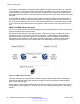
Table Of Contents
- Contents
- Chapter 1: Introduction
- Chapter 2: New in this release
- Chapter 3: Network design fundamentals
- Chapter 4: Hardware fundamentals and guidelines
- Chapter 5: Optical routing design
- Chapter 6: Platform redundancy
- Chapter 7: Link redundancy
- Chapter 8: Layer 2 loop prevention
- Chapter 9: Spanning tree
- Chapter 10: Layer 3 network design
- Chapter 11: SPBM design guidelines
- Chapter 12: IP multicast network design
- Multicast and VRF-Lite
- Multicast and MultiLink Trunking considerations
- Multicast scalability design rules
- IP multicast address range restrictions
- Multicast MAC address mapping considerations
- Dynamic multicast configuration changes
- IGMPv3 backward compatibility
- IGMP Layer 2 Querier
- TTL in IP multicast packets
- Multicast MAC filtering
- Guidelines for multicast access policies
- Multicast for multimedia
- Chapter 13: System and network stability and security
- Chapter 14: QoS design guidelines
- Chapter 15: Layer 1, 2, and 3 design examples
- Chapter 16: Software scaling capabilities
- Chapter 17: Supported standards, RFCs, and MIBs
- Glossary

In this figure, configuration A is optimal because VRRP convergence occurs within 2 to 3 seconds.
In configuration A, three spanning tree instances exist and VRRP runs on the link between the two
routers. Spanning tree instance 2 exists on the link between the two routers, which separates the
link between the two routers from the spanning tree instances found on the other devices. All uplinks
are active.
In configuration B, VRRP convergence takes between 30 and 45 seconds because it depends on
spanning tree convergence. After initial convergence, spanning tree blocks one link (an uplink), so
only one uplink is used. If an error occurs on the uplink, spanning tree reconverges, which can take
up to 45 seconds. After spanning tree reconvergence, VRRP can take a few more seconds to fail
over.
VRRP and ICMP redirect messages
You can use VRRP and Internet Control Message Protocol (ICMP) together. However, doing so can
provide nonoptimal network performance.
Consider the network shown in the following figure. Traffic from the client on subnet 30.30.30.0,
destined for the 10.10.10.0 subnet, is sent to routing switch 1 (VRRP Master). Routing switch 1
forwards this traffic on the same subnet to routing switch 2, where it is routed to the destination.
With ICMP redirect enabled, for each packet received, routing switch 1 sends an ICMP redirect
message to the client to inform it of a shorter path to the destination through routing switch 2.
Figure 20: ICMP redirect messages
If network clients do not recognize ICMP redirect messages, disable ICMP redirect messages on
VSP 4000 to avoid excessive ICMP redirect messages. Avaya recommends the network design
shown in the following figure.
Ensure that the routing path to the destination through both routing switches has the same metric to
the destination. One hop goes from 30.30.30.0 to 10.10.10.0 through routing switch 1 and routing
switch 2.
Layer 3 network design
60 Network Design Reference for Avaya VSP 4000 Series January 2015
Comments? infodev@avaya.com