
Design Reference


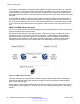
Table Of Contents
- Contents
- Chapter 1: Introduction
- Chapter 2: New in this release
- Chapter 3: Network design fundamentals
- Chapter 4: Hardware fundamentals and guidelines
- Chapter 5: Optical routing design
- Chapter 6: Platform redundancy
- Chapter 7: Link redundancy
- Chapter 8: Layer 2 loop prevention
- Chapter 9: Spanning tree
- Chapter 10: Layer 3 network design
- Chapter 11: SPBM design guidelines
- Chapter 12: IP multicast network design
- Multicast and VRF-Lite
- Multicast and MultiLink Trunking considerations
- Multicast scalability design rules
- IP multicast address range restrictions
- Multicast MAC address mapping considerations
- Dynamic multicast configuration changes
- IGMPv3 backward compatibility
- IGMP Layer 2 Querier
- TTL in IP multicast packets
- Multicast MAC filtering
- Guidelines for multicast access policies
- Multicast for multimedia
- Chapter 13: System and network stability and security
- Chapter 14: QoS design guidelines
- Chapter 15: Layer 1, 2, and 3 design examples
- Chapter 16: Software scaling capabilities
- Chapter 17: Supported standards, RFCs, and MIBs
- Glossary

BackupMaster routes all traffic received on the BackupMaster IP interface according to the switch
routing table.
Figure 17: VRRP with BackupMaster
Avaya recommends that you stagger VRRP instances on a network or subnet basis. The following
figure shows the VRRP Masters and BackupMasters for two subnets. For more information about
how to configure VRRP using the Avaya Command Line Interface (ACLI) and Enterprise Device
Manager (EDM), see Avaya Virtual Services Platform 4000 Series
Configuration — IP Routing,
NN46251-505.
Figure 18: VRRP network configuration
The VRRP BackupMaster uses the VRRP standardized backup switch state machine. Thus, VRRP
BackupMaster is compatible with standard VRRP.
Avaya recommends that you use the following best practices to implement VRRP:
• Do not configure the virtual address as a physical interface that is used on the routing switches.
Instead, use a third address, for example:
-
Interface IP address of VLAN A on Switch 1 = x.x.x.2
- Interface IP address of VLAN A on Switch 2 = x.x.x.3
- Virtual IP address of VLAN A = x.x.x.1
Note:
Avaya does not support a VRRP virtual IP address that is the same as the local physical
address of the device.
• Configure the VRRP holddown timer with enough time that the Interior Gateway Protocol (IGP)
routing protocol has time to update the routing table. In some cases, configuring the VRRP
Layer 3 network design
58 Network Design Reference for Avaya VSP 4000 Series January 2015
Comments? infodev@avaya.com