
Design Reference

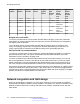




Table Of Contents
- Contents
- Chapter 1: Introduction
- Chapter 2: New in this release
- Chapter 3: Network design fundamentals
- Chapter 4: Hardware fundamentals and guidelines
- Chapter 5: Optical routing design
- Chapter 6: Platform redundancy
- Chapter 7: Link redundancy
- Chapter 8: Layer 2 loop prevention
- Chapter 9: Spanning tree
- Chapter 10: Layer 3 network design
- Chapter 11: SPBM design guidelines
- Chapter 12: IP multicast network design
- Multicast and VRF-Lite
- Multicast and MultiLink Trunking considerations
- Multicast scalability design rules
- IP multicast address range restrictions
- Multicast MAC address mapping considerations
- Dynamic multicast configuration changes
- IGMPv3 backward compatibility
- IGMP Layer 2 Querier
- TTL in IP multicast packets
- Multicast MAC filtering
- Guidelines for multicast access policies
- Multicast for multimedia
- Chapter 13: System and network stability and security
- Chapter 14: QoS design guidelines
- Chapter 15: Layer 1, 2, and 3 design examples
- Chapter 16: Software scaling capabilities
- Chapter 17: Supported standards, RFCs, and MIBs
- Glossary

The system can perform rate metering only on a Layer 3 basis.
Traffic shapers buffer and delay violating traffic. These operations occur at the egress level. VSP
4000 supports traffic shaping at the port level.
QoS interface considerations
Four QoS interface types are explained in detail in the following sections. You can configure an
interface as trusted or untrusted, and for bridging or routing operations. Use these parameters to
properly apply QoS to network traffic.
Trusted and untrusted interfaces
You can configure an interface as trusted (core) or untrusted (access). The default is trusted (core).
Use trusted interfaces (core) to mark traffic in a specific way, and to ensure that packets are treated
according to the service level of those markings. Use a core interface if you need control over
network traffic prioritization. For example, use 802.1p-bits to apply desired class of service (CoS)
attributes to the packets before they are forwarded to the access node. You can also classify other
protocol types ahead of IP packets.
A core port preserves the DSCP and 802.1p-bits markings. The device uses these values to assign
a corresponding QoS level to the packets.
Use an access port to control the classification and mapping of traffic for delivery through the
network. Untrusted interfaces require you to configure filter sets to classify and re-mark ingress
traffic. For untrusted interfaces in the packet forwarding path, the DSCP is mapped to an IEEE
802.1p user priority field in the IEEE 802.1Q frame, and both of these fields are mapped to an IP
Layer 2 drop precedence value that determines the forwarding treatment at each network node
along the path. Traffic that enters an access port is re-marked with the appropriate DSCP and
802.1p markings, and given an internal QoS level. The switch performs this re-marking based on the
filters and traffic policies that you configure.
The following logical table shows how the system performs ingress mappings for data packets and
for control packets not destined for the Control Processor (CP).
Table 22: Data packet ingress mapping
Enable
DiffServ
Access
DiffServ
802.1p
Override
Routed
Packet
Tagged
Ingress
Packet
Internal
QoS
Derived
From
Egress
Packet
DSCP
Derived
from
Egress
Packet
802.1p
Derived
from
1 0, L3T=1 0, L2T=1 1 1 DSCP Stays
untouched
iQoS
1 0, L3T=1 0, L2T=1 0 1 .1p Stays
untouched
iQoS
1 0, L3T=1 0, L2T=1 X 0 DCSP Stays
untouched
iQoS
Table continues…
QoS interface considerations
January 2015 Network Design Reference for Avaya VSP 4000 Series 131
Comments? infodev@avaya.com