
Design Reference


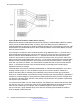
Table Of Contents
- Contents
- Chapter 1: Introduction
- Chapter 2: New in this release
- Chapter 3: Network design fundamentals
- Chapter 4: Hardware fundamentals and guidelines
- Chapter 5: Optical routing design
- Chapter 6: Platform redundancy
- Chapter 7: Link redundancy
- Chapter 8: Layer 2 loop prevention
- Chapter 9: Spanning tree
- Chapter 10: Layer 3 network design
- Chapter 11: SPBM design guidelines
- Chapter 12: IP multicast network design
- Multicast and VRF-Lite
- Multicast and MultiLink Trunking considerations
- Multicast scalability design rules
- IP multicast address range restrictions
- Multicast MAC address mapping considerations
- Dynamic multicast configuration changes
- IGMPv3 backward compatibility
- IGMP Layer 2 Querier
- TTL in IP multicast packets
- Multicast MAC filtering
- Guidelines for multicast access policies
- Multicast for multimedia
- Chapter 13: System and network stability and security
- Chapter 14: QoS design guidelines
- Chapter 15: Layer 1, 2, and 3 design examples
- Chapter 16: Software scaling capabilities
- Chapter 17: Supported standards, RFCs, and MIBs
- Glossary

Multicast and MultiLink Trunking considerations
Multicast traffic distribution is important because the bandwidth requirements can be substantial
when a large number of streams are employed. Avaya Virtual Services Platform 4000 Series
can
distribute IP multicast streams over links of a multilink trunk using the following method.
Multicast flow distribution over MLT
MultiLink Trunking (MLT) distributes multicast streams over a multilink trunk based on the source
MAC address and the destination MAC address. As a result, the load is distributed on different ports
of the multilink trunk more evenly. This functionality is enabled by default on the VSP 4000 and
cannot be manually configured.
Multicast scalability design rules
The following section lists the design rules to increase multicast route scaling.
Important:
The current release of the VSP 4000 does not support the following:
• Protocol-Independent Multicast (PIM)
• Split MultiLink Trunking (SMLT) and Routed-SMLT (RSMLT)
• High Availability (HA)
Multicast scalability design rules
1. Whenever possible, use simple network designs that do not use VLANs that span several
switches. Instead, use routed links to connect switches.
2.
Whenever possible, group sources sending to the same group in the same subnet. Avaya
Virtual Services Platform 4000 Series uses a single egress forwarding pointer for all sources
in the same subnet sending to the same group. Be aware that these streams have separate
hardware forwarding records on the ingress side.
3. Do not configure multicast routing on edge switch interfaces that do not contain multicast
senders or receivers. By following this rule, you:
• Provide secure control over multicast traffic that enters or exits the interface.
• Reduce the load on the switch, as well as the number of routes. This improves overall
performance and scalability.
4. Avoid initializing many (several hundred) multicast streams simultaneously. Initial stream
setup is a resource-intensive task, and initializing a large number can increase the setup
time. In some cases, this delay can result in stream loss.
5. Whenever possible, do not connect IP multicast sources and receivers by using VLANs that
interconnect switches (see the following figure). In some cases, this can result in excessive
hardware record use. By placing the source on the interconnected VLAN, traffic takes two
paths to the destination, depending on the reverse path forwarding (RPF) checks and the
shortest path to the source.
Multicast and MultiLink Trunking considerations
January 2015 Network Design Reference for Avaya VSP 4000 Series 107
Comments? infodev@avaya.com