
Installation Instructions





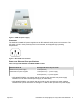
Table Of Contents
- Installation Job Aid (English) for Avaya VSP 4000 4850GTS
- How to get help
- Notices
- Safety messages
- Before you begin
- Installing the Avaya Virtual Services Platform 4000 on a table or shelf
- Installing the Avaya Virtual Services Platform 4000 in an equipment rack
- Installing SFP transceivers
- Removing SFP transceivers
- Power specifications for Avaya VSP 4000 switches 4850GTS and 4850GTS-PWR+
- Avaya Virtual Services Platform power supply power specification
- Installing the Avaya Virtual Services Platform 4000 power supply
- Connecting to AC power

Table 2: DC power supply specifications
Specifications 4850GTS-DC
Output power 300 W
Input voltage 48 V DC
Input current 10 A
Output voltage 12 V DC
Output current 25 A
Avaya Virtual Services Platform power supply power specification
The Avaya Virtual Services Platform 4000 supports two external field replaceable power supplies.
One power supply ships with the chassis. You can install a secondary power supply to provide
redundancy, load sharing, and to add Power over Ethernet Plus (PoE+) power budget on PWR+
models.
1000W AC power supply
VSP 4000 4850GTS-PWR+ supports dual 54V 1000W Power over Ethernet Plus (PoE+) AC power
supplies.
Important:
Ensure that you use only 1000W power supplies (both primary and secondary) on VSP 4000
PWR+ models.
Figure 1: 1000W AC power supply
300W AC power supply
The Avaya VSP 4850GTS supports 300W AC power supplies.
July 2015 Installation Job Aid (English) for Avaya VSP 4000 4850GTS 8