
Installation Instructions




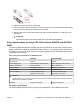

Table Of Contents
- Installation Job Aid (English) for Avaya VSP 4000 4850GTS
- How to get help
- Notices
- Safety messages
- Before you begin
- Installing the Avaya Virtual Services Platform 4000 on a table or shelf
- Installing the Avaya Virtual Services Platform 4000 in an equipment rack
- Installing SFP transceivers
- Removing SFP transceivers
- Power specifications for Avaya VSP 4000 switches 4850GTS and 4850GTS-PWR+
- Avaya Virtual Services Platform power supply power specification
- Installing the Avaya Virtual Services Platform 4000 power supply
- Connecting to AC power

Installing the Avaya Virtual Services Platform 4000 in an equipment rack
To install an Avaya VSP 4000 switch in an equipment rack, perform this procedure.
Prerequisites for installing the Avaya Virtual Services Platform 4000 in an equipment rack:
• Ensure that you have a space of 1.75 inches (4.45 centimeters) in height for each switch in an
EIA or IEC-standard 19-inch (48.2-centimeter) equipment rack.
• The rack is bolted to the floor and braced if necessary.
• The rack is grounded to the same grounding electrode used by the power service in the area.
The ground path must be permanent and must not exceed 1 Ohm of resistance from the rack
to the grounding electrode.
Caution:
When you mount the device in a rack, do not stack units directly on top of one another. You
must secure each unit to the rack with the appropriate mounting brackets. Mounting brackets
cannot support multiple units.
1. Remove the screws that hold the USB cover but do not remove the USB cover.
Caution:
On a factory-supplied 4850GTS series switch, do not remove the USB device cover or
the USB device from the slot. Removing the USB device affects system operation
and may even prevent the system from booting up successfully. Ensure that the USB
device is inserted in the system at all times with the USB cover on.
2. Attach the L-bracket to each side of the switch using a #2 Phillips screwdriver as illustrated
below.
Important:
On a factory-supplied 4850GTS series switch, ensure that the L-bracket goes over the
USB cover.
July 2015 Installation Job Aid (English) for Avaya VSP 4000 4850GTS 5