
Installation Instructions




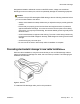


Table Of Contents
- Contents
- Chapter 1: Avaya Virtual Services Platform 4000 regulatory information and safety precautions
- International regulatory statements of conformity
- National electromagnetic compliance (EMC) statements of compliance
- FCC statement (USA only)
- ICES statement (Canada only)
- CE marking statement (Europe only)
- European Union and European Free Trade Association (EFTA) notice
- VCCI statement (Japan/Nippon only)
- BSMI statement (Taiwan only)
- MIC notice (Republic of Korea only)
- National Safety Statements of Compliance
- EN 60950 statement
- NOM statement (Mexico only)
- Información NOM (unicamente para México)
- Denan statement (Japan/Nippon only)
- National Environmental Statements of Compliance
- Restriction on Hazardous Substances Directive Compliance Statement
- WEEE Directive Compliance Statement
- Notices
- Chapter 2: Introduction
- Chapter 3: New in this release
- Chapter 4: Hardware compatibility
- Chapter 5: Installing the Avaya Virtual Services Platform 4000
- Installation fundamentals
- Electrostatic discharge
- Environmental requirements
- Package contents
- Installing the Avaya Virtual Services Platform 4000 on a table or shelf
- Installing the Avaya Virtual Services Platform 4000 in an equipment rack
- Cable requirements for the Avaya Virtual Services Platform 4000
- Installation and removal of Small Form-factor Pluggable (SFP) transceivers
- RJ-45 connector pin assignments
- Console port pin assignments
- Power specifications for the Avaya Virtual Services Platform 4000
- Avaya Virtual Services Platform power supply power specification
- Installing the Avaya Virtual Services Platform 4000 power supply
- Connect AC power
- Check Light Emitting Diode (LED) on the Avaya Virtual Services Platform 4000
- Chapter 6: Translations of safety messages

designed and tested to withstand common mode ESD events, voltage can sometimes
discharge to some connector pins, which can potentially damage the networking equipment.
Caution:
To protect the Avaya VSP 4000 against ESD damage, take the following measures before
you connect data cables to the device:
• Always use antistatic wrist straps. Make sure you adjust the strap to provide good skin
contact.
• Ensure that you properly ground work surfaces and equipment racks for protection
against electrostatic discharge. You must connect the common point to the building
ground wire. In a properly wired building, the nearest reliable ground is typically at the
electrical outlet.
• Avoid contact between equipment and clothing. The wrist or ankle strap protects only
the equipment from ESD voltages on the body; ESD voltages on clothing can still cause
damage.
• Avoid touching any connector pins.
• Do not remove the wrist or ankle strap until the installation is complete.
Preventing electrostatic damage in new cable installations
With new cable installations, Avaya recommends that you use an ESD discharge cable to
reduce the potential for damage from static, that can build up in cables. The following figure
illustrates an ESD cable.
Figure 3: Job aid
To install the ESD discharge cable, perform this procedure.
Electrostatic discharge
Installation February 2014 27