
Installation Instructions


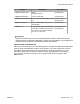




Table Of Contents
- Contents
- Chapter 1: Avaya Virtual Services Platform 4000 regulatory information and safety precautions
- International regulatory statements of conformity
- National electromagnetic compliance (EMC) statements of compliance
- FCC statement (USA only)
- ICES statement (Canada only)
- CE marking statement (Europe only)
- European Union and European Free Trade Association (EFTA) notice
- VCCI statement (Japan/Nippon only)
- BSMI statement (Taiwan only)
- MIC notice (Republic of Korea only)
- National Safety Statements of Compliance
- EN 60950 statement
- NOM statement (Mexico only)
- Información NOM (unicamente para México)
- Denan statement (Japan/Nippon only)
- National Environmental Statements of Compliance
- Restriction on Hazardous Substances Directive Compliance Statement
- WEEE Directive Compliance Statement
- Notices
- Chapter 2: Introduction
- Chapter 3: New in this release
- Chapter 4: Hardware compatibility
- Chapter 5: Installing the Avaya Virtual Services Platform 4000
- Installation fundamentals
- Electrostatic discharge
- Environmental requirements
- Package contents
- Installing the Avaya Virtual Services Platform 4000 on a table or shelf
- Installing the Avaya Virtual Services Platform 4000 in an equipment rack
- Cable requirements for the Avaya Virtual Services Platform 4000
- Installation and removal of Small Form-factor Pluggable (SFP) transceivers
- RJ-45 connector pin assignments
- Console port pin assignments
- Power specifications for the Avaya Virtual Services Platform 4000
- Avaya Virtual Services Platform power supply power specification
- Installing the Avaya Virtual Services Platform 4000 power supply
- Connect AC power
- Check Light Emitting Diode (LED) on the Avaya Virtual Services Platform 4000
- Chapter 6: Translations of safety messages

Hardware Description Part number
10GBASE-SR/SW SFP+ 850 nm
Range up to 300 m
AA1403015-E6
10GBASE ZR/ZW SFP+ 1550 nm 70km SMF AA1403016-E6
10GBASE-ER CWDM SFP
+
1470 to 1610 nm with a range up to 40
km
AA1403153-E6 to
AA1403160-E6
10GBASE-LRM SFP+ 220 m, 1260 to 1355 nm; 1310 nm
nominal MMF
AA1403017-E6
10GBase-CX 4-pair twinaxial copper cable that plugs
into the SFP+ socket and connects two
10 Gb ports. The supported lengths
are 3 m, 5 m, and 10 m.
AA1403018-E6 to
AA1403020-E6
Important:
Avaya recommends that you use Avaya branded SFP and SFP+ transceivers as they
undergo extensive qualification and testing. Avaya is not responsible for any problems that
arise from using non-Avaya branded SFP and SFP+ transceivers.
Optical power considerations
When you connect the device to collocated equipment, ensure that enough optical attenuation
exists to avoid overloading the receivers of each device. You must consider the minimum
attenuation requirement based on the specifications of third-party equipment. For more
information about minimum insertion losses for Avaya optical products, see Installing
Transceivers and Optical components on the Avaya Virtual Services Platform 4000,
NN46251-301.
Supported optical devices
Installation February 2014 23