
Design Reference
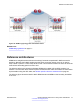


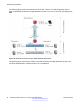
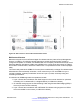


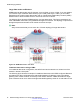
Table Of Contents
- Contents
- Chapter 1: Introduction
- Chapter 2: New in Release 4.0.50
- Chapter 3: New in Release 4.0.40
- Chapter 4: New in Release 4.0
- Chapter 5: Network design fundamentals
- Chapter 6: Hardware fundamentals and guidelines
- Chapter 7: Optical routing design
- Chapter 8: Platform redundancy
- Chapter 9: Link redundancy
- Chapter 10: Layer 2 loop prevention
- Chapter 11: Spanning tree
- Chapter 12: Layer 3 network design
- Chapter 13: SPBM design guidelines
- Chapter 14: IP multicast network design
- Multicast and VRF-Lite
- Multicast and MultiLink Trunking considerations
- Multicast scalability design rules
- IP multicast address range restrictions
- Multicast MAC address mapping considerations
- Dynamic multicast configuration changes
- IGMPv3 backward compatibility
- IGMP Layer 2 Querier
- TTL in IP multicast packets
- Multicast MAC filtering
- Guidelines for multicast access policies
- Multicast for multimedia
- Chapter 15: System and network stability and security
- Chapter 16: QoS design guidelines
- Chapter 17: Layer 1, 2, and 3 design examples
- Chapter 18: Software scaling capabilities
- Chapter 19: Supported standards, RFCs, and MIBs
- Glossary

Large data center architecture
SPBM supports data centers with IP shortcuts, Layer 2 VSNs, or Layer 3 VSNs. If you use vMotion,
you must use Layer 2 between data centers (Layer 2 VSN). With Layer 2 VSNs, you can add IP
addresses to the VLAN on both data centers and run Virtual Router Redundancy Protocol (VRRP)
between them to allow the ESX server to route to the rest of the network.
The following figure shows an SPBM topology of a large data center. This figure represents a full-
mesh VENA data center fabric using SPBM for storage over Ethernet. This topology is optimized for
storage transport because traffic never travels more than two hops.
Note:
Avaya recommends that you use a two-tier, full-mesh topology for large data centers.
Figure 42: SPBM data center—full mesh
Traditional data center routing of VMs:
In a traditional data center configuration, the traffic flows into the network to a VM and out of the
network in almost a direct path.
The following figure shows an example of a traditional data center with VRRP configured. Because
end stations are often configured with a static default gateway IP address, a loss of the default
gateway router causes a loss of connectivity to the remote networks. VRRP eliminates the single
point of failure that can occur when the single static default gateway router for an end station is lost.
SPBM design guidelines
90 Network Design Reference for Avaya VSP 4000 Series December 2014
Comments? infodev@avaya.com