
User guide





configure system-ip
ExtremeWarePx1 1.2 Command Reference Guide 51
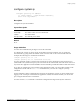
configure system-ip
configure system-ip <IP address>
[(/ <mask length>) | (network-mask <netmask>)]
{vlan <vlan tag number>}
Description
ConÞgures the system IP address.
Syntax Description
Default
N/A.
Usage Guidelines
You must have administrator privileges to issue this command.
To conÞgure the switch, you must specify its IP address and network mask. You can specify the
network mask by giving either the number of bits set in the mask or the network mask itself. For
example, the following two commands are identical:
configure system-ip 64.1.1.10 / 24
configure system-ip 64.1.1.10 network-mask 255.255.255.0
You may optionally specify a VLAN for the switch. The Px series application switch supports up to
4,096 VLANs. The system IP and proxy IPs must reside in the same VLAN; VIPs and servers can be on
any VLAN. The application switch identiÞes VLANs with 802.1q VLAN ID numbers rather than names.
If you plan to conÞgure the system VLAN on the application switch, you must enable VLANs on the
conÞguration switch with the enable vlan command before you issue the conÞgure system-ip
command.
For the SummitPx1, before conÞguring the VLAN for the application switch, you must enable VLAN
tagging on the switch port connected to the application switch, and add the VLANs you need to the
port, using the manufacturerÕs instructions.
You must use the build command to commit the conÞguration changes made by this command.
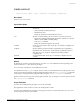
IP address IP address for the switch
mask length The number of bits set in the network mask.
netmask The network mask.
vlan tag number The VLAN tag for the switch.