
User's Guide


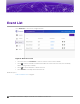


Table Of Contents

• Network Stop
Stage
Indicates if the event has been started or stopped. You can sort by Stage value. Valid values are:
• Begin
• End
Scheduled At
Date and time the event was scheduled to run.
Started At
Date and time the event actually ran.
Note
Factors such as system status or system load can impact the Start and Duration of an
event. Details for specific events are provided on the Dashboard and Logs page.
Duration
Duration of the event.
Actions
Actions you can take on an event. Valid values are:
• Go to event Scheduler screen. In the new view, the event briefly flashes making it easy to
identify.
•
View event parameters.
• View log details about event execution.
• Delete event.
Related Topics
Add Scheduled Events on page 17
Logs
22 Scheduler for Extreme Campus Controller User Guide for version 1.2.0