
Deployment Guide
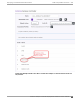
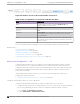
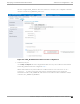

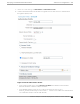


Table Of Contents
- Table of Contents
- Preface
- About Extreme Campus Controller Deployment
- Configuring DHCP, NPS, and DNS Services
- Centralized Site with a Captive Portal
- Centralized Site with AAA Network
- Deploying a Mesh Network
- Configuring an External NAC Server for MBA and AAA Authentication
- Manage RADIUS Servers for User Authentication
- External Captive Portal on a Third-Party Server
- Access Control Rule Admin Portal Access
- Deploying Centralized Web Authentication
- Deploying ExtremeCloud IQ - SE as an External Captive Portal
- Deployment Strategy
- Configuring an External Captive Portal Network
- Editing the Configuration Profile for Network and Roles
- Extreme Campus Controller Default Pass-Through Rule
- Adding Extreme Campus Controller as a Switch to ExtremeCloud IQ - Site Engine
- Editing the Unregistered Policy on ExtremeCloud IQ - Site Engine
- Editing the ExtremeCloud IQ - Site Engine Profile for Policy and Location-Based Services
- Deploying an ExtremeGuest Captive Portal
- Deploying Client Bridge
- Deploying an Availability Pair
- Deploying Universal APs
- Extreme Campus Controller Pair with ExtremeLocation and AirDefense
- ECP Local Authentication
- PHP External Captive Portal, Controller’s Firewall Friendly API
- Index

We have configured CWA_WebAuth. Notice the reference to the policy rule configured on Extreme
Campus Controller: ACL_WEBAUTH_Redirect.
Figure 47: CWA_WebAuth Authorization Profile Configuration
2. Define the policy set.
Go to Policy > Policy Set. We have configured AH-CWA. The Policy Set includes the Authorization
Profile CWA_WebAuth that was configured in Step 1.
Add an Authorization Policy that includes the condition: Radius-Called-Station-ID –
Contains – x, where x is the SSID of the network. The Authorization Policy assigns the
Authorization Profile (CWA_WEBAUTH) that references the redirection Role on Extreme Campus
Controller (ACL_WEBAUTH_REDIRECT).
Deploying Centralized Web Authentication
CWA Server Configuration — ISE
Extreme Campus Controller Deployment Guide for version 5.46.03 133