
Manual







ETC Supplement
Eos Family v2.2.0
Eos Family Operations Manual Supplement Page 5 Electronic Theatre Controls, Inc.
Display Icons
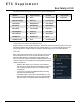
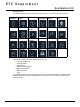
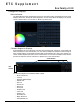
The following displays can be selected, and they will open in a new tab in the selected frame:
The following displays can have multiple instances open:
• Channel (Tombstone)
• Channel (Table)
• Split Channel
• Playback Status Display
• Magic Sheet Display
• Effect Channels
•Park
For multiple instances of the same display, the tab number will be followed with a decimal number.
Additional tabs will start their numbering with n.2. If you have only one instance, there will be no
decimal number.
Channel
(Tombstones)
Channel
(Table)
Split Channel Playback
Status Display
Magic Sheet
Display
Magic Sheet
List
Patch Groups Intensity
Palettes
Focus Palettes Color Palettes Beam Palettes
Presets Effects Effect
Channels
Submasters Cue List Pixel Maps
Macros Snapshots Curves Park Show Control