
Manual







ETC Supplement
Eos Family v2.2.0
Eos Family Operations Manual Supplement Page 4 Electronic Theatre Controls, Inc.
Home Screen
Upon start up or creation of a new show file, any connected monitor that is not already displaying
the Live or Playback Status Displays will show the Display Management Home Screen.
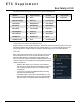
This screen consists of four general areas, each offering different display-related options.
Layout Options
These tools offer you greater flexibility in the number of tabs you can view in any given workspace.A
workspace can have up to four frames. Selecting a layout icon will assign the frame layout identified
in the icon. Once a layout is assigned, you can select which displays and controls will be in which
frames.
Snapshots Area
Layout Options
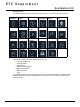
Display Icons
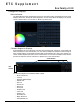
Control Icons