
Autopetfeeder Manual


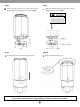

Press the PROG button again. The display shows 2 which
means that we are setting the second feed.
Repeat programming from no. 2.5.2 to 2.5.10 to complete
programming the second feed time.
Similarly we can set 8 schedules for all days of the week by pressing the PROG button to go from program 1 to program 8.
Press the CLOCK button to exit from the PROG mode.
Connect the cord of the feeder into the timer side of
the timer.
Fig 32
Fig 31
2.5.11
2.5.12
ON
2.6.1
2.6 Connecting the Feeder into the Timer
17