
Autopetfeeder Manual





10
2.3.4 Setting the days of Week
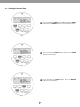
Press PROG button to enter in to the prog mode. The
display will show 1 which means that we are
setting the 1
st
schedule ON time.
Press the WEEK button once and the display will show all
days option.
Fig 10
Fig 11
This option will set a common schedule for the entire week and this is recommended for all pet owners unless there are
special requirements.
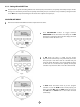
Press WEEK button again and the display will show the each
day option. This is the 2
nd
option, where the user can select
another schedule that can be programmed. Toggle through
the days of the WEEK by pressing the week button.
Fig 12
ON