
Operation Manual




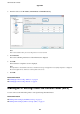


7. Select the devices for which you want to perform batch settings with the Status column set to Unassigned,
and the Process Status set to Assign Successful.
When making multiple selections, press Ctrl or Shi and click or drag your mouse.
8. Click Transmit.
9. When the password entry screen is displayed, enter the password, and then click OK.
Transmit the settings.
c
Important:
e
information is transmitted to the network interface until the progress meter is
nished.
Do not turn
o
the
device or the wireless adapter, and do not send any data to the device.
10.
On the Transmitting Settings screen, click OK.
Administrator's Guide
Appendix
76