
Operation Manual
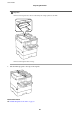


Inserting an External USB Device
Inserting and Removing an External USB Device
1. Insert an external USB device into the printer.
2. When you have nished using the external USB device, remove the device.
Related Information
&
“External USB Device
Specications
” on page 299
&
“Accessing an External USB Device From a Computer” on page 44
Accessing an External USB Device From a Computer
You can write or read data on an external USB device such as a USB ash drive that has been inserted in the
printer from a computer.
c
Important:
When sharing an external device inserted in the printer between computers connected over USB and over a
network, write access is only allowed to the computers that are connected by the method you selected on the printer.
To write to the external USB device, select a connection method from the following menu on the printer's control
panel.
Settings > General Settings > Printer Settings > Memory Device Interface > File Sharing.
Note:
It takes a while to recognize data from a computer if a large capacity external storage USB device, such as a device that is 2
TB, is connected.
Windows
Select an external USB device in Computer or My Computer.
e
data on the external USB device is displayed.
User's Guide
Preparing the Printer
44