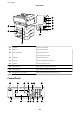
A
Document cover Blocks external light while scanning.
B
Scanner glass Place the originals.
C
Control panel Operates the printer.
You can change the angle of the control panel.
D
External interface USB port Connects memory devices.
User's Guide
Printer Basics
18