
Operation Manual






Related Information
& “Printing Basics” on page 127
& “More Options Tab” on page 145
Printing a Watermark
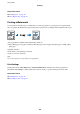
You can print a watermark such as "Condential" or an anti-copy pattern on your printouts. If you print with an
anti-copy pattern, the hidden letters appear when photocopied in order to distinguish the original from the copies.
Anti-Copy Pattern is available under the following conditions:
❏ Paper: Plain paper, Copy paper, Letterhead, Recycled paper, Colored paper, Preprinted paper, or High quality
plain paper
❏ Quality: Standard
❏ Automatic 2-sided printing: Not selected
❏ Color Correction: Automatic
Note:
You can also add your own watermark or anti-copy pattern.
Print Settings
On the printer driver's More Options tab, click Watermark Features, and then select Anti-Copy Pattern or
Watermark. Click Settings to change details such as the size, density, or position of the pattern or the mark.
Related Information
& “Printing Basics” on page 127
& “More Options Tab” on page 145
User's Guide
Printing
139