
Operation Manual

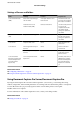



Settings of Servers and Folders
Name Settings Location Requirement
Scan to Network Folder
(SMB)
Create and set up sharing of
the save folder
A computer that has a save
folder location
The administrative user
account to the computer
that creates save folders.
Destination for Scan to
Network Folder (SMB)
Contacts of the device User name and password
to log on to the
computer that has the
save folder, and the
privilege to update the
save folder.
Scan to Network Folder
(FTP)
Setup for FTP server log on Contacts of the device Logon information for
the FTP server and the
privilege to update the
save folder.
Scan to Email Setup for email server Device Setup information for
email server
Scan to Cloud Printer registration to Epson
Connect
Device Internet connection
environment
Contact registration to Epson
Connect
Epson Connect service User and printer
registration to Epson
Connect service
Scan to Document
Capture Pro (when using
Document Capture Pro
Server/Document
Capture Pro)
Server setup for Document
Capture Pro
Device IP address, host name, or
FQDN for the computer
that Document Capture
Pro Server/Document
Capture Pro is installed
on
Related Information
& “Conguring a Mail Server” on page 38
& “Using Document Capture Pro Server/Document Capture Pro” on page 72
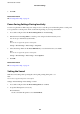
Using Document Capture Pro Server/Document Capture Pro
By using Document Capture Pro Server/Document Capture Pro (server mode), you can manage the sorting
method, saving format, and forwarding destination of a scanning result executed from the printer's control panel.
You can call and execute a job previously registered on the server from the printer's control panel.
Install it on the server computer.
For more information on Document Capture Pro Server, contact your local Epson
oce.
Related Information
& “Setting Server Mode” on page 73
Administrator's Guide
Function Settings
72