
Operation Manual


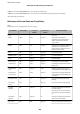


Service Name Protocol type Local port
number
Remote port
number
Features controlled
CIFS (Remote) TCP Any port 445 CIFS client (forwarding scan data and
received fax data to a folder)
NetBIOS Name
Service (Local)
UDP 137 Any port CIFS server (Sharing a network folder)
NetBIOS
Datagram
Service (Local)
UDP 138 Any port
NetBIOS Session
Service (Local)
TCP 139 Any port
NetBIOS Name
Service (Remote)
UDP Any port 137 CIFS client (forwarding scan data and
received fax data to a folder)
NetBIOS
Datagram
Service (Remote)
UDP Any port 138
NetBIOS Session
Service (Remote)
TCP Any port 139
HTTP (Local) TCP 80 Any port HTTP(S) server (forwarding data of
Web Cong and WSD)
HTTPS (Local) TCP 443 Any port
HTTP (Remote) TCP Any port 80 HTTP(S) client (communicating
between Epson Connect or Google
Cloud Print, rmware updating and
root certicate updating)
HTTPS (Remote) TCP Any port 443
Conguration Examples of IPsec/IP Filtering
Receiving IPsec packets only
is
example is to
congure
a default policy only.
Default Policy:
❏ IPsec/IP Filtering: Enable
❏ Access Control: IPsec
❏ Authentication Method: Pre-Shared Key
❏ Pre-Shared Key: Enter up to 127 characters.
Group Policy: Do not congure.
Receiving printing data and printer settings
is
example allows communications of printing data and printer
conguration
from
specied
services.
Default Policy:
❏ IPsec/IP Filtering: Enable
❏ Access Control: Refuse Access
Administrator's Guide
Advanced Security Settings for Enterprise
204