
Operation Manual




Item Description
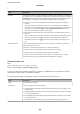
Inbox settings ❏ Options when memory is full: You can select the operation to print the received fax or refuse
to receive it when the Inbox memory is full.
❏ Inbox Password Settings: Password protects the Inbox to restrict users from viewing received
faxes. Select Change to change the password, and select Reset to cancel password
protection. When changing or resetting the password, you need the current password.
You cannot set a password when Options when memory is full has been set to Receive
and print faxes.
Forward Settings You can specify a subject for the email when forwarding to an email address.
(Menu)
Note:
You cannot print the list from the Web Cong screen. {
Item Description
Print Conditional Save/
Forward list
Prints the Conditional Save/Forward list.
Related Information
& “Features to Save and Forward Received Faxes Without Condition” on page 156
& “Setting Saving and Forwarding to Receive Faxes (Unconditional Save/Forward)” on page 156
& “Features to Save and Forward Received Faxes With Condition” on page 159
& “Setting Saving and Forwarding to Receive Faxes (Conditional Save/Forward)” on page 159
Print Settings Menu
You can nd the menu on the printer's control panel below:
Settings > General Settings > Fax Settings > Receive Settings > Print Settings
Note:
On the Web Cong screen, you can nd the menu below:
Fax tab > Receive Settings > Fax Output
Item Description
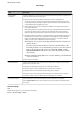
Auto Reduction Prints received faxes with large-size documents reduced to t on the paper in the paper source.
Reducing may not always be possible depending on the received data. If this is turned
o,
large
documents are printed at their original size on multiple sheets, or a blank second page may be
ejected.
Split Page Settings Prints received faxes with the page split when the size of the received documents is larger than
the size of the paper loaded in the printer.
Acting Print Make print settings when the document size of the received fax is larger than the size of the
paper loaded in the printer.
Selecting On(Split to pages) splits the document longitudinally to print the received
document. Selecting On (Reduce to Fit) reduces to a 50 % minimum to print.
Administrator's Guide
Fax Settings
168