
Operation Manual




Receive Settings Menu
Related Information
& “Save/Forward Settings Menu” on page 165
& “Print Settings Menu” on page 168
Save/Forward Settings Menu
You can nd the menu on the printer's control panel below:
Settings > General Settings > Fax Settings > Receive Settings > Save/Forward Settings
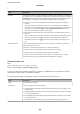
Unconditional Save/Forward
Note:
On the Web Cong screen, you can nd the menu below:
Fax tab > Receive Settings > Fax Output
You can set saving and forwarding destinations to the Inbox, a computer, an external memory device, email
addresses, shared folders, and other fax machines. You can use these features at the same time. If you set all items
to O on the printer's control panel, the printer is set to print received faxes.
Item Description
Save to Inbox Saves received faxes to the printer's Inbox. Up to 200 documents can be saved. Note that saving
200 documents may not be possible depending on the usage conditions such as the le size of
saved documents, and using of multiple fax saving features at a time.
Though the received faxes are not automatically printed, you can view them on the printer's
screen and print only the ones you need. However, if you select Yes and P rin t in another item,
such as Save to Computer in Unconditional Save/Forward, the received faxes are printed
automatically.
Save to Computer
Saves received faxes as PDF les on a computer connected to the printer. You can set this to Ye s
by using only the FAX Utility. Install FAX Utility on the computer in advance. After setting this to
Ye s , you can change this to Yes a nd Pri nt.
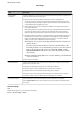
Save to Memory Device Saves received faxes as PDF les to an external memory device connected to the printer.
Selecting Ye s and Print prints received faxes while saving them to the memory device.
Received documents are saved in the printer's memory temporarily before the documents are
saved in the memory device connected to the printer. Because a memory full error disables
sending and receiving faxes, keep the memory device connected to the printer.
Administrator's Guide
Fax Settings
165