
Operation Manual




System Requirements
❏ Windows 10 (32-bit, 64-bit)/Windows 8.1 (32-bit, 64-bit)/Windows 8 (32-bit, 64-bit)/Windows 7 (32-bit, 64-
bit)/Windows Vista (32-bit, 64-bit)/Windows XP SP3 or later (32-bit)/Windows XP Professional x64 Edition SP2
or later/Windows Server 2016/Windows Server 2012 R2/Windows Server 2012/Windows Server 2008 R2/
Windows Server 2008/Windows Server 2003 R2/Windows Server 2003 SP2 or later
❏ macOS Sierra/OS X El Capitan/OS X Yosemite/OS X Mavericks/OS X Mountain Lion/Mac OS X v10.7.x/Mac
OS X v10.6.8
Note:
❏ Mac OS may not support some applications and features.
❏ e UNIX File System (UFS) for Mac OS is not supported.
Installing the Optional Units
Optional Paper Cassette Unit Code
e following is the code for the optional paper cassette unit.
Optional Cassette Unit (C12C932871)
Installing the Optional Paper Cassette Units
!
Caution:
❏ Make sure you turn o the printer, unplug the power cord from the printer, and disconnect any cables before
starting installation. Otherwise, the power cord may be damaged resulting in re or electric shock.
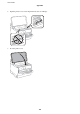
❏ When liing the printer, place your hands in the positions shown below. If you li the printer holding other
positions, the printer may fall or you may trap your ngers when placing the printer.
1.
Turn o the printer by pressing the
P
button, and then unplug the power cord.
2. Disconnect any connected cables.
3. Remove the optional paper cassette unit from its box, and then remove any protective materials.
4. Place the optional paper cassette unit where you want to set up the printer.
User's Guide
Appendix
113