
Operation Manual




Items Settings and Explanation
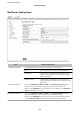
Sender's Email Address Enter the sender's email address such as the email address of the system administrator. This
is used when authenticating, so enter a valid email address that is registered to the mail
server.
Enter between 0 and 255 characters in ASCII (0x20-0x7E) except for : ( ) < > [ ] ; ¥. A period "."
cannot be the rst character.
SMTP Server Address Enter between 0 and 255 characters using A-Z a-z 0-9 . - . You can use IPv4 or FQDN format.
SMTP Server Port Number Enter a number between 1 and 65535.
Secure Connection Select the encryption method of the communication to the mail server.
None
If you select POP before SMTP in Authentication Method,
the connection is not encrypted.
SSL/TLS
This is available when Authentication Method is set to O
or SMTP AUTH. Communication is encrypted from the start.
STARTTLS
This is available when Authentication Method is set to O
or SMTP AUTH. Communication is not encrypted from the
start, but depending on the network environment, whether
the communication is encrypted or not is changed.
Certicate Validation
The certicate is validated when this is enabled. We recommend this is set to Enable. To set
up, you need to import the CA Certicate to the printer.
POP3 Server Address
If you select POP before SMTP as the Authentication Method, enter the POP3 server
address between 0 and 255 characters using A-Z a-z 0-9 . - . You can use IPv4 or FQDN
format.
POP3 Server Port Number
If you select POP before SMTP as the Authentication Method, enter a number between 1
and 65535.
Related Information
& “Conguring a Mail Server” on page 37
Checking a Mail Server Connection
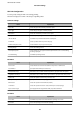
You can check the connection to the mail server by performing the connection check.
1. Access Web Cong and select the Network tab > Email Server > Connection Test.
2. Select Start.
e connection test to the mail server is started. Aer the test, the check report is displayed.
Related Information
& “Accessing Web Cong” on page 27
& “Mail Server Connection Test References” on page 40
Administrator's Guide
Function Settings
39