
Operation Manual


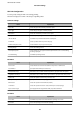


Items Explanation
Binary Set whether to accept the binary data or not.
PDF Page Size Set the paper size for PDF printing.
Conguring
a Mail Server
Set the mail server from Web Cong.
When the printer can send the email, receiving the email
notication
from the printer is enabled.
Check below before setting up.
❏ e printer is connected to the network that can access the mail server.
❏ Email setting information of the computer that uses the same mail server as the printer.
Note:
When you use the mail server on the Internet, conrm the setting information from the provider or website.
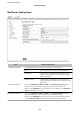
1. Access Web Cong and select the Network tab > Email Server > Basic.
2.
Enter a value for each item.
3. Select OK.
e settings you have selected are displayed.
When the setup completes, perform the connection check.
Related Information
& “Checking a Mail Server Connection” on page 39
& “Mail Server Setting Items” on page 38
&
“Accessing Web
Cong
” on page 27
Administrator's Guide
Function Settings
37