
Operation Manual
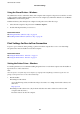


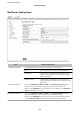


2. Set each item.
❏ Paper Size Notice
Set whether to display an error on the control panel when the paper size of the
specied
paper source is
dierent from the paper size of the print data.
❏ Paper Type Notice
Set whether to display an error on the control panel when the paper type of the specied paper source is
dierent from the paper type of the print data.
❏ Auto Error Solver
Set whether to automatically cancel the error if there is no operation on the control panel for 5 seconds
aer displaying the error.
3. Check the settings, and then click OK.
Related Information
& “Accessing Web
Cong
” on page 27
Universal Print Settings
Set when you print from external devices without using the printer driver.
Some items are not displayed depending on the printing language of your printer.
1. Access Web
Cong
and select the Print tab > Universal Print Settings.
2. Set each item.
3.
Check the settings, and then click OK.
Related Information
& “Accessing Web Cong” on page 27
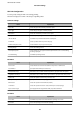
Basic
Items Explanation
Top Oset(-30.0-30.0mm) Sets the vertical position of the paper on which printing starts.
Left Oset(-30.0-30.0mm) Sets the horizontal position of the paper on which printing starts.
Top Oset in Back(-30.0-30.0mm) Sets the vertical position of the paper on which the printing of the back side of
the paper starts in duplex printing.
Left Oset in Back(-30.0-30.0mm) Sets the horizontal position of the paper on which the printing of the back side of
the paper starts in duplex printing.
Check Paper Width Set whether to check paper width when printing.
Skip Blank Page If there is a blank page in the print data, set not to print a blank page.
Administrator's Guide
Function Settings
35