
Operation Manual




4. Select Additional Computer on the Connection Type screen.
5. Follow the on-screen instructions.
Basic Settings for Printing
Set the print settings, such as paper size or printing error.
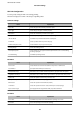
Paper Source Settings
Set the size and type of paper to be loaded in each paper source.
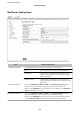
1. Access Web Cong and select the Print tab > Paper Source Settings.
2. Set each item.
e
displayed items may vary by the situation.
❏ Paper source name
Display the target paper source name, such as Rear Paper Feed, Cassette 1.
❏ Paper Size
Select the paper size you want to set from the pull-down menu.
❏ Unit
Select the unit of the user-dened size. You can select it when User-Dened is selected on Paper Size.
Administrator's Guide
Function Settings
33