
Operation Manual


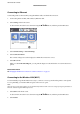




4. Select Use for Proxy Server Settings.
5. Enter the address for the proxy server by IPv4 or FQDN format.
Conrm the value reected on the previous screen.
6. Enter the port number for the proxy server.
Conrm the value reected on the previous screen.
7. Select Start Setup.
8. Close the conrmation screen.
Connecting to LAN
Connect the printer to the network by Ethernet or Wi-Fi.
Related Information
& “Connecting to Ethernet” on page 24
& “Connecting to the Wireless LAN (Wi-Fi)” on page 24
Administrator's Guide
Network Connection
23