
Operation Manual


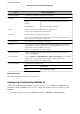


5. When a completion message is displayed, select Close.
e
screen automatically closes
aer
a
specic
length of time if you do not select Close.
Problems Using Network Security Features
Forgot a Pre–shared Key
Re-congure a pre-shared key.
To change the key, access Web Cong and select the Network Security tab > IPsec/IP Filtering > Basic > Default
Policy or Group Policy.
When you change the pre-shared key, congure the pre-shared key for computers.
Related Information
& “Accessing Web Cong” on page 27
Cannot Communicate with IPsec Communication
Specify the algorithm that the printer or the computer does not support.
e printer supports the following algorithms. Check the settings of the computer.
Security Methods Algorithms
IKE encryption algorithm AES-CBC-128, AES-CBC-192, AES-CBC-256, AES-GCM-128*, AES-GCM-192*,
AES-GCM-256*, 3DES
IKE authentication algorithm SHA-1, SHA-256, SHA-384, SHA-512, MD5
IKE key exchange algorithm DH Group1, DH Group2, DH Group5, DH Group14, DH Group15, DH
Group16, DH Group17, DH Group18, DH Group19, DH Group20, DH
Group21, DH Group22, DH Group23, DH Group24, DH Group25, DH
Group26, DH Group27*, DH Group28*, DH Group29*, DH Group30*
ESP encryption algorithm AES-CBC-128, AES-CBC-192, AES-CBC-256, AES-GCM-128, AES-GCM-192,
AES-GCM-256, 3DES
ESP authentication algorithm SHA-1, SHA-256, SHA-384, SHA-512, MD5
AH authentication algorithm SHA-1, SHA-256, SHA-384, SHA-512, MD5
*available for IKEv2 only
Related Information
& “Encrypted Communication Using IPsec/IP Filtering” on page 111
Administrator's Guide
Advanced Security Settings for Enterprise
127