
Operation Manual


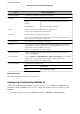


2. Enter a certicate in the Client Certicate.
You can copy the certicate if it is published by a Certication Authority. To copy, select the certicate from
Copy From, and then click Copy.
Related Information
& “Accessing Web Cong” on page 27
& “Obtaining and Importing a CA-signed Certicate” on page 99
Checking IEEE802.1X Network Status
You can check the IEEE802.1X status by printing a network status sheet. For more information on printing a
network status sheet, see the printer's documentation.
Status ID IEEE802.1X Status
Disable IEEE802.1X feature is disable.
EAP Success IEEE802.1X authentication has succeeded and network connection is available.
Authenticating IEEE802.1X authentication has not been completed.
Cong Error Authentication has failed since the user ID has not been set.
Client Certicate Error Authentication has failed since the client certicate is out of date.
Administrator's Guide
Advanced Security Settings for Enterprise
125