
Operation Manual


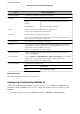


Items Settings and Explanation
Connection Method The connection method of a current network is displayed.
EAP Type Select an option for an authentication method between the printer and a RADIUS server.
EAP-TLS You need to obtain and import a CA-signed certicate.
PEAP-TLS
PEAP/MSCHAPv2 You need to congure a password.
User ID Congure an ID to use for an authentication of a RADIUS server.
Enter 1 to 128 1-byte ASCII (0x20 to 0x7E) characters.
Password Congure a password to authenticate the printer.
Enter 1 to 128 1-byte ASCII (0x20 to 0x7E) characters. If you are using a Windows server as a
RADIUS server, you can enter up to 127 characters.
Conrm Password Enter the password you congured for conrmation.
Server ID You can congure a server ID to authenticate with a specied RADIUS server. Authenticator
veries
whether a server ID is contained in the subject/subjectAltName
eld
of a server
certicate
that is sent from a RADIUS server or not.
Enter 0 to 128 1-byte ASCII (0x20 to 0x7E) characters.
Certicate Validation You can set certicate validation regardless of the authentication method. Import the
certicate in CA Certicate.
Anonymous Name
If you select PEAP-TLS or PEAP/MSCHAPv2 for Authentication Method, you can congure
an anonymous name instead of a user ID for a phase 1 of a PEAP authentication.
Enter 0 to 128 1-byte ASCII (0x20 to 0x7E) characters.
Encryption Strength You can select one of the followings.
High AES256/3DES
Middle AES256/3DES/AES128/RC4
Related Information
& “Conguring an IEEE802.1X Network” on page 122
Conguring a Certicate for IEEE802.1X
Congure the Client Certicate for IEEE802.1X. When you set it, you can use EAP-TLS and PEAP-TLS as an
authentication method of IEEE802.1x. If you want to congure the certication authority certicate, go to CA
Certicate.
1. Access Web
Cong
and then select the Network Security tab > IEEE802.1X > Client
Certicate
.
Administrator's Guide
Advanced Security Settings for Enterprise
124