
Operation Manual


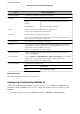


2. Import the certicate in Client Certicate.
If you have already imported a certicate published by a Certication Authority in IEEE802.1X or SSL/TLS,
you can copy the certicate and use it in IPsec/IP Filtering. To copy, select the certicate from Copy From, and
then click Copy.
Related Information
& “Accessing Web Cong” on page 27
& “Obtaining a CA-signed Certicate” on page 99
Connecting the Printer to an IEEE802.1X Network
Conguring an IEEE802.1X Network
When you set IEEE802.1X to the printer, you can use it on the network connected to a RADIUS server, a LAN
switch with authentication function, or an access point.
1. Access Web Cong and then select the Network Security tab > IEEE802.1X > Basic.
2.
Enter a value for each item.
If you want to use the printer on a Wi-Fi network, click Wi - Fi S e t u p and select or enter an SSID.
Administrator's Guide
Advanced Security Settings for Enterprise
122