
Operation Manual

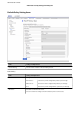


Items Settings and Explanation
Remote Gateway(Tunnel
Mode)
If you select Tunnel Mode for Encapsulation, enter a gateway address between 1 and 39
characters.
Security Protocol
IPsec for Access Control, select an option.
ESP Select this to ensure the integrity of an authentication and data,
and encrypt data.
AH Select this to ensure the integrity of an authentication and data.
Even if encrypting data is prohibited, you can use IPsec.
Algorithm Settings*
IKE Encryption Select the encryption algorithm for IKE.
The items vary depending on the version of IKE.
Authentication Select the authentication algorithm for IKE.
Key Exchange Select the key exchange algorithm for IKE.
The items vary depending on the version of IKE.
ESP Encryption Select the encryption algorithm for ESP.
This is available when ESP is selected for Security Protocol.
Authentication Select the authentication algorithm for ESP.
This is available when ESP is selected for Security Protocol.
AH Authentication Select the encryption algorithm for AH.
This is available when AH is selected for Security Protocol.
* For Algorithm Settings, it is recommended that you select Any for all settings or select an item other than Any
for each setting. If you select Any for some of the settings and select an item other than Any for the other settings,
the device may not communicate depending on the other device that you want to authenticate.
Related Information
&
“
Conguring
Default Policy” on page 111
Conguring Group Policy
A group policy is one or more rules applied to a user or user group. e printer controls IP packets that match with
congured policies. IP packets are authenticated in the order of a group policy 1 to 10 then a default policy.
1. Access Web Cong and then select the Network Security tab > IPsec/IP Filtering > Basic.
2. Click a numbered tab you want to
congure.
3. Enter a value for each item.
4. Click Next.
A
conrmation
message is displayed.
Administrator's Guide
Advanced Security Settings for Enterprise
115