
Operation Manual
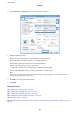




5. Select Print Settings from the pop-up menu.
6. Make the following settings.
❏ Paper Source: Select the paper source in which you loaded the paper.
❏ Media Type: Select the type of paper you loaded.
Make sure you select the correct paper type to optimize the print quality.
❏ Grayscale: Select to print in black or shades of gray.
7. Click Print.
Related Information
& “Available Paper and Capacities” on page 42
& “Loading Paper in the Paper Cassette” on page 46
& “Loading Paper in the Rear Paper Feed” on page 48
&
“Loading Paper in the Front Paper Feed Slot” on page 50
&
“List of Paper Types” on page 45
Printing on 2-Sides
You can use either of the following methods to print on both sides of the paper.
❏ Automatic 2-sided printing
❏ Manual 2-sided printing (for Windows only)
When the printer has nished printing the rst side, ip the paper over to print on the other side.
User's Guide
Printing
63