
Operation Manual



Installing the Optional Paper Cassette Units
You can install up to three paper cassette units.
!
Caution:
❏ Make sure you turn o the printer, unplug the power cord from the printer, and disconnect any cables before
starting installation. Otherwise, the power cord may be damaged resulting in re or electric shock.
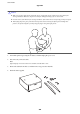
❏ When liing the printer, place your hands in the positions shown below. If you li the printer holding other
positions, the printer may fall or you may trap your ngers when placing the printer.
c
Important:
If you are using the optional cabinet, install it under the bottom of the paper cassette unit in advance.
1. Turn
o
the printer by pressing the
P
button, and then unplug the power cord.
2. Disconnect any connected cables.
Note:
If other optional paper cassette units have been installed, uninstall them as well.
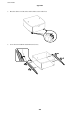
3. Remove the optional paper cassette unit from its box, and then remove any protective materials.
4. Check the items supplied.
User's Guide
Appendix
209