
Operation Manual



c
Important:
❏ When storing or transporting the printer, avoid tilting it, placing it vertically, or turning it upside down;
otherwise ink may leak.
❏ Leave the ink cartridges installed. Removing the cartridges can dry out the print head and may prevent the
printer from printing.
❏ Leave the maintenance box installed; otherwise ink may leak during transporting.
1.
Turn o the printer by pressing the
P
button, and then unplug the power cord.
2.
Disconnect any connected cables.
3. Remove all of the paper from the printer.
4. Make sure there are no originals on the printer.
5. Store the paper support and the output tray.
6. Uninstall the optional cabinet or paper cassette units.
7. Repack the printer in its box, using the protective materials.
Remove the protective materials before you use the printer again.
If print quality has declined the next time you print, clean and align the print head.
Related Information
& “Part Names and Functions” on page 18
& “Checking and Cleaning the Print Head” on page 131
& “Aligning the Print Head” on page 132
Installing the Optional Units
Optional Cabinet Code
e
following is the code for the optional cabinet.
Optional Cabinet
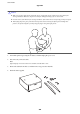
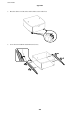
Installing the Optional Cabinet
e cabinet can be attached to the printer and the optional paper cassette units.
User's Guide
Appendix
203