
Operation Manual



Printer Transfer and Transportation
!
Caution:
❏ When carrying the printer,
li
it using a stable position.
Liing
the printer using an unstable position may result
in injury.
❏ Because this printer is heavy, always use two people to carry it when unpacking or transporting.
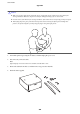
❏ When liing the printer, place your hands in the positions shown below. If you li the printer holding other
positions, the printer may fall or you may trap your
ngers
when placing the printer.
❏ When carrying the printer, do not tilt it more than 10 degrees; otherwise the printer may fall.
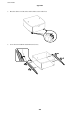
❏ When installing the printer on the optional cabinet, lock the casters before starting installation. If the cabinet
moves unexpectedly, you may be injured.
Printer Transfer Within a Short Distance
Turn o the printer and disconnect the power cord and cables. Do not apply vibrations to the printer and keep it
level while carrying.
When lifting the printer
If you have installed the optional cabinet and the paper cassette units, remove them, and then li the printer.
When moving the printer on the casters
If you have installed the optional cabinet, you can move the printer without
liing
it because the cabinet has
casters. However, do not move over uneven or rough surfaces to avoid impacts to the printer. Uninstall the stands
for the cabinet and unlock the casters before moving.
Transporting the Printer
Prepare the printer for transport as described here.
User's Guide
Appendix
202