
Operation Manual


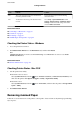


Code Problem Solution
313 A communication error has occurred.
❏ Select Setup > System Administration > Wi-Fi/
Network Settings > Advanced Setup > Email
Server > Server Settings, and then check the
server settings.
❏ Check the network connection. See the Network
Guide for more details.
314 The data size exceeds the maximum size for attached
les.
❏ Increase the Attached File Max Size setting in
the scan settings.
❏ Lower the scanning resolution or increase the
compression ratio to reduce the size of the
scanned image.
315 The memory is full. Retry after other ongoing jobs are nished.
321 A DNS error has occurred.
❏ Select Setup > System Administration > Wi-Fi/
Network Settings > Advanced Setup > DNS
Server, and then check the DNS settings.
❏ Check the DNS settings for the server, the
computer, or the access point.
322 An authentication error has occurred.
Check the Location settings.
323 A communication error has occurred.
❏ Check the Location settings.
❏ Check the network connection. See the Network
Guide for more details.
324 A le with the same name already exists in the
specied folder.
❏ Delete the le with the same name.
❏ Change the le name prex in File Settings.
325 There is not enough storage space available in the
specied folder.
❏ Increase the storage space in the specied folder.
❏ Reduce the number of documents.
❏ Lower the scanning resolution or increase the
compression ratio to reduce the size of the
scanned image.
327 The memory is full. Wait until other ongoing jobs are nished.
328 The destination was wrong or the destination does
not exist.
Check the Location settings.
331 A communication error occurred while acquiring the
destination list.
Check the network connection. See the Network
Guide for more details.
332 There is not enough storage space available to save
the scanned image in the destination storage.
Reduce the number of documents.
333 The destination could not be found because the
destination information was uploaded to the server
before sending the scanned image.
Select the destination again.
334 An error occurred while sending the scanned image. -
User's Guide
Solving Problems
155