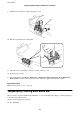
5. Pull out rear cover 2.
6. Remove the cover inside the back of the printer.
7. Slide out the two used maintenance rollers, and remove them.
8.
Insert two new maintenance rollers until they click into place.
User's Guide
Replacing Ink Cartridges and Other Consumables
72