
Operation Manual


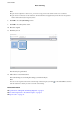




11. Select the job from the drop-down list, and then click the icon.
e selected job is performed.
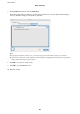
12. Follow the on-screen instructions.
e scanned image is saved using the settings you made for the job.
Note:
You can scan the originals and send the scanned image without using the job. Click and make scanning settings,
and then click Preview Scan. Next, click the destination to which you want to send the scanned image.
Related Information
& “Specications of Originals and Placing Originals” on page 27
& “Document Capture Pro / Document Capture” on page 14
Scanning Using Epson DocumentScan
Note:
Connect the scanner to the smart device before scanning.
1.
Place the original.
2. Start Epson DocumentScan.
User's Guide
Basic Scanning
49