
Operation Manual





Note:
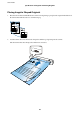
❏ You may need to stop using a Carrier Sheet that is scratched or has been scanned more than 3,000 times.
❏ If you cannot nd an appropriate size for the original you want to scan in Document Size, try changing the setting.
Click Scan Settings > Detailed Settings on the Scan Settings window > Document Size on the Epson Scan 2
window, and then select Auto Detect or Customize to create a custom document size.
When scanning a Carrier Sheet by selecting Auto Detect as the Document Size setting, the image is automatically
scanned by applying Paper Skew as the Correct Document Skew setting.
❏ Only use the Carrier Sheet designed for your scanner.
User's Guide
Specications of Originals and Placing Originals
37