
Operation Manual





Note:
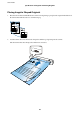
❏ You can scan long paper up to 1,828.8 mm (72 inches) in length with a resolution of 300 dpi or less.
❏ You need to specify the paper size in Document Capture Pro.
Click Scan Settings > Detailed Settings on the Scan Settings window to open the Epson Scan 2 window.
ere are three ways to specify the paper size. If the paper length is 863.6 mm (34 inches) or less, you can select Auto
Detect (Long Paper) to detect the size automatically.
If the paper length is more than 863.6 mm (34 inches), you need to select Customize and enter the size of the paper.
You can either enter the width and height of the paper or use Detect paper length instead of entering the paper height.
❏ Support the long paper on the input side so that it does not drop out of the input slot, and on the output side so that the
ejected paper does not fall from the output slot.
Related Information
& “Specications of Originals” on page 27
& “Basic Scanning” on page 38
& “Advanced Scanning” on page 54
Placing Receipts
Supporting it by hand, load the receipt straight into the le side of the input slot, facing up with the top edge facing
into the scanner.
User's Guide
Specications of Originals and Placing Originals
32