
User`s guide




Maintenance 98
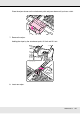
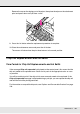
Remove the cap on the wiping part of the wiper, then place the wiper on the attachment
point and press down until you hear a click.
9. Press the Z button when the replacement procedure is complete.
10.Close the maintenance cover and press the Z button.
The menus will close when the print head returns to its normal position.
Chip Unit Replacement and Ink Refills
Time Period for Chip Unit Replacements and Ink Refills
If the message Chip unit expended is displayed on the control panel, this means that the
chip unit needs to be replaced soon. Obtain an ink pack of the appropriate color as soon
as possible.
You will be unable to print if the chip unit for even one color needs to be replaced. If the
Chip unit expended message is displayed during a print job, you can replace the chip unit
and refill the ink while printing continues.
For information on compatible ink packs, see “Options and Consumable Products” on page
129.