
User`s guide





Maintenance 86
❏ Touch a metallic object before starting work to discharge any static electricity.
Part Cleaning
To preserve print quality and ensure good results, clean around the print head as
suggested below.
❏ When colors in the printout are faint or missing even after the head has been cleaned.
❏ When the printout is smudged.
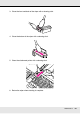
Clean the parts in the following order:
(1) Print head
(2) Wiper
(3) Caps
(4) Wiper rail
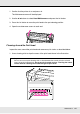
Moving the Print Head
This section describes how to position the print head for part cleaning.
Important:
Be sure to follow the steps below when positioning the print head. Moving the print head
manually could cause malfunction.