
User`s guide





Basic Operations 39
1. Turn on the printer by pressing the P button.
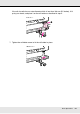
2. Loosen the roll holder fixing screws and adjust the roll holders so that the gap between
the two is wider than the media.
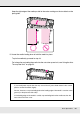
3. Place the media on a lifter oriented according to how it is rolled (see below) and move
the lift to position the media as indicated by the mark on the label.
Printable side out
Important:
If the right holder handle shaft is not visible, rotate the handle forward until it stops.
The media cannot be properly loaded if the handle shaft is not visible.