
User`s guide





Basic Operations 34
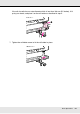
10.Pull out the edge of the media and insert it into the printer.
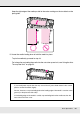
11.Insert the media past the pressure rollers and lower the media loading lever to hold it in
place.
Confirm that the left edge of the media passes over the center of the square in the label
on the loading guide.
Note:
Media that is heavy and difficult to unroll can be fed by pressing the drive switch on the left
roll holder.
Printable side out
Printable side in