
User`s guide




Basic Operations 29
When the Standard Media Feeding Unit Is Installed
This section describes how to load media when the standard media feeding unit is
installed.
1. Turn on the printer by pressing the P button.
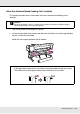
2. Loosen the roll holder fixing screws and adjust the roll holders so that the gap between
the two is wider than the media.
Center the roll supports between the roll holders.
c
Caution:
Because the media is heavy, it should not be carried by one person. When loading or
removing the media, use at least two persons.
Important:
If the right holder handle shaft is not visible, rotate the handle forward until it stops.
The media can not be properly loaded if the handle shaft is not visible.