
User`s guide





Introduction 15
Control Panel
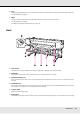
7Handle
After placing media on the right roll holder, rotate the handle to press the holder and apply pressure to the roll core.
1 P button (power button)
Turns the power on and off.
2 P light (power light)
The printer's operational status is indicated by a lit or flashing light.
On : The power is on.
Flashing : The printer is receiving data or performing head cleaning or other operations during shut-down.
Off : The power is off.